
Epic Games
These guides require that you own Among Us on Epic Games.
It is highly recommended to install using the Heroic Games Launcher method, but an alternative is to use the EpicGamesStarter.
Heroic Games Launcher
1. If you don't already have it, down Heroic Games Launcher. Once installed, log in to your Epic Games account and install Among Us.
2. Download the latest epic-msstore.zip folder for Town of Us: Mira.
3. On Heroic Games Launcher, go to Library and right-click Among Us and go to Details. On the right side, you will see
Install Path:. Click this to open the game directory folder.4. Extract the .zip folder. Copy all contents and paste them into the Among Us folder opened in Step 3. Your folder should look like the example below.
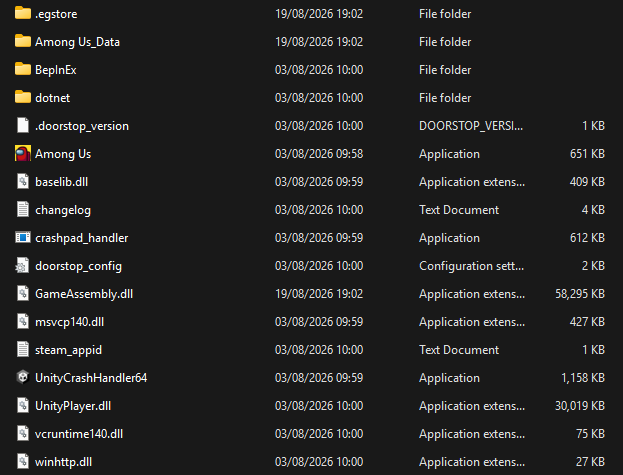
5. Launch the game from Heroic Games Launcher. If successful, it will show the Town of Us: Mira logo in the top-left corner.
EpicGamesStarter
1. Download the latest epic-msstore.zip folder for Town of Us: Mira.
2. Download the EpicGamesStarter.exe.zip and extract the exe file.
- Note: the EpicGamesStarter may be flagged as an uncommon or dangerous file; this is a false positive with antivirus. The file is safe and made by a Town of Us developer.
3. Navigate to the main installation location (e.g., C:\Program Files\Epic Games). Make a copy of the main Among Us folder and rename it to something like Among Us - TOU Mira. Move the new folder to either your desktop or somewhere such as
C:\Users\YOURNAME\Games4. Extract the contents of the .zip folder you downloaded and open it. Copy all of the contents and paste them into the new TOU Mira folder. Add the EpicGamesStarter to this folder. It should look like this example:
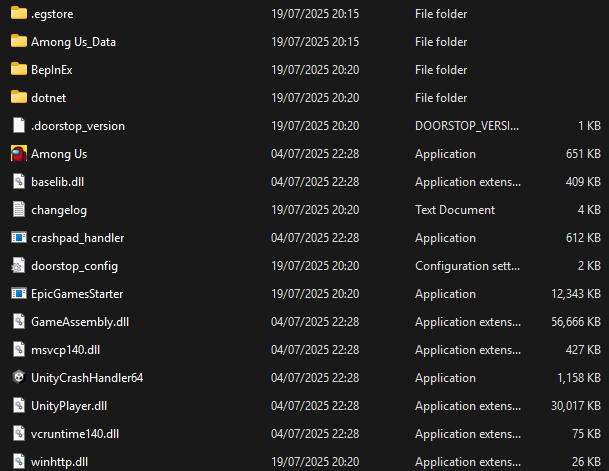
5. Launch the game using the EpicGamesStarter.exe. If installed correctly, the game will launch with the Town of Us: Mira logo displayed in the top-left corner.
If you encounter any issues installing, please join the Town of Us Discord server and open a Town of Us Support ticket in the TOU Support channel.